2027 Biweekly Family Budget + Tax-Ready Spreadsheet

The private family budget for biweekly paychecks.

No bank linking. No subscription. Tax-ready by April.

Plan every bill around the paycheck that covers it, see one clear "Safe to Spend" number, and keep your tax-relevant spending organized all year. It's one spreadsheet, and it works in Google Sheets and Excel.

$14 launch price , regular price$19 One-time purchase
  • Instant digital download for Google Sheets and Excel
  • Your numbers stay in your own file. Nothing to connect.
  • Includes a filled-in sample family so you can see how it works
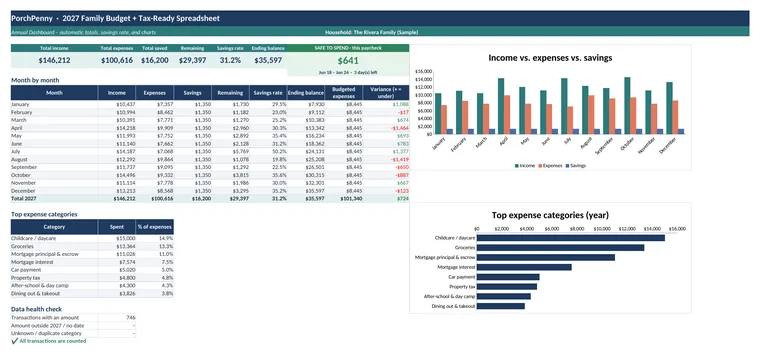
Annual Dashboard from the sample file: yearly income, expenses, savings rate, month-by-month table, and charts
Safe to Spend box from the sample file showing $641 for the current pay period
Sound familiar?

Monthly budgets don't fit biweekly paychecks

Most budgets assume money shows up once a month. If you're paid every other Friday, that leaves gaps.

Bills land before payday

The mortgage is due on the 1st, but the paycheck arrives on the 3rd. A monthly total can't show you which check has to cover which bill.

Bank sync keeps breaking

Budget apps that link to your bank tend to disconnect, double-count, or ask you to sign in again, and plenty of people would rather not hand over their bank login at all.

Another subscription

App prices keep going up every year. Paying monthly for a tool that tracks your spending is its own line item.

"Surprise" yearly costs

Property tax, car repairs, holidays, and annual memberships show up every year, yet still catch the budget off guard.

The April scramble

Childcare receipts, donations, medical bills, and side income end up spread across emails, drawers, and bank statements.

"Can we afford this?"

With bills, savings, and upcoming costs all in play, it's hard to know what's actually free to spend until the next payday.

The PorchPenny way

A budget that thinks in paychecks

Enter your paydays and bills once. The spreadsheet works out the rest and keeps everything on your own device or in your own Google Drive.

Every bill gets a paycheck

Each bill is assigned to the paycheck that arrives before it's due, so you can see what each check has to cover.

One number to check

"Safe to Spend" subtracts upcoming bills, sinking-fund set-asides, planned savings, and spending so far.

Tax totals as you go

Tag tax-relevant categories once. Totals build by quarter, and a checklist tracks your forms as they arrive.

Features

Everything a biweekly household needs, in one file

Light-blue cells are for typing. Everything else calculates on its own. The screenshots below come from the included sample family's file.

Paycheck Planner

See which paycheck pays which bill

Enter each earner's schedule and the spreadsheet lists every 2027 payday. Add your monthly bills, and each one is matched to the paycheck right before its due date.

  • Biweekly by default, with weekly, semi-monthly, and monthly options for each earner
  • Three-paycheck months are flagged so you can plan for them ahead of time
  • Shows what's left from each paycheck after bills, sinking funds, and savings
Safe to Spend

One clear number for this pay period

Safe to Spend takes this paycheck, then subtracts bills due before the next payday, sinking-fund set-asides, planned savings, and the flexible spending you've already logged. It also shows days left in the period and a per-day amount.

Sinking Funds

Yearly costs, split across paychecks

List the big or irregular costs you know are coming, like property tax, vacation, holidays, or car maintenance. Enter a target and a due month, and you'll see how much to set aside from each paycheck, with a progress bar for each fund.

CSV Import

Paste your bank export. No bank login needed.

Download a transaction file from your bank's website and paste the date, description, and amount. Suggested categories appear for merchants you've used before, odd rows get flagged, and you copy the ready block into Transactions. There are no macros and no connections.

Tax Summary

Tax-relevant spending, totaled by quarter

Tag categories like childcare, charitable giving, medical, HSA, education, side income, business expenses, mortgage interest, and property tax. They add up by quarter and for the year, with a note on the form each one commonly relates to.

It's an organizing tool, not tax advice. Always check totals against your official forms.

Tax Document Checklist

Know which forms you're still waiting on

W-2s, 1099s, 1098s, childcare provider details, donation receipts, and more. Mark what applies to you, track each document's status as it arrives, and see your percent complete before you sit down to file.

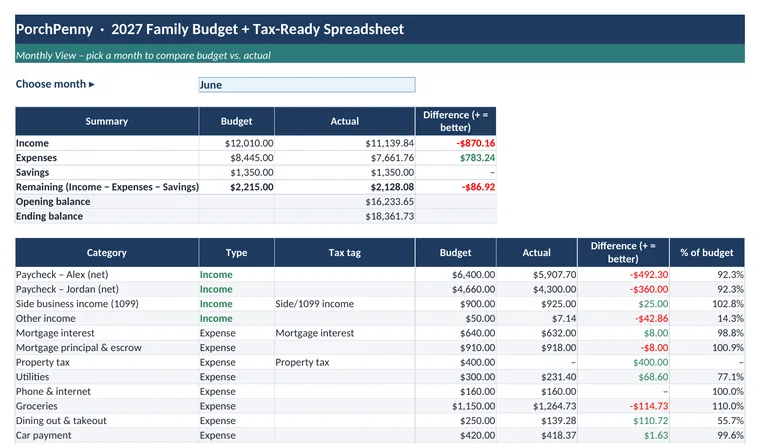
Monthly View: budget versus actual for each category in a chosen month
Monthly View

Budget vs. actual, any month

Pick a month and compare what you planned with what happened, category by category.

Annual Dashboard with yearly totals, savings rate, and charts
Annual Dashboard

Your whole year at a glance

Yearly totals, month-by-month results, top spending categories, charts, and a data check that confirms every transaction is counted.

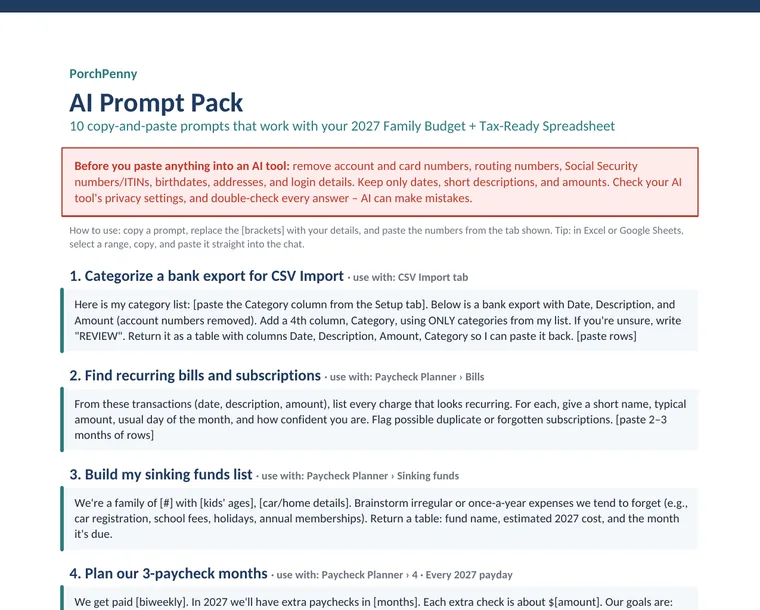
First page of the AI Prompt Pack PDF
Bonus

AI Prompt Pack

10 copy-and-paste prompts for ChatGPT-style assistants, like sorting a bank export or finding forgotten subscriptions, plus privacy tips on what never to paste.

What's included

Everything in your download

  • Blank 2027 budget spreadsheetYour working copy, with 9 tabs: Start Here, Setup, Paycheck Planner, Transactions, CSV Import, Monthly View, Annual Dashboard, Tax Summary, and Tax Checklist.
  • Sample-family copyThe same file filled in with an example household, so you can see how every tab works before entering your own numbers.
  • Google Sheets versionOpen it in Google Sheets with a "make a copy" link, or upload the .xlsx to your Drive.
  • Quick Start guideOne page with five setup steps.
  • Bonus: AI Prompt Pack10 prompts that work with the spreadsheet's tabs.
Launch price

2027 Biweekly Family Budget + Tax-Ready Spreadsheet

$14 regular $19
  • One-time purchase, no subscription
  • Google Sheets + Excel
  • No bank linking, and no macros
  • Instant digital download
Buy now, $14

Secure checkout through our store platform. For personal household use. Questions? Email hello@porchpenny.com.

Compatibility

Works in Google Sheets + Excel

Use the app you already have. The file stays with you, not on our servers.

Google Sheets

Free with any Google account. Make your own copy, then use it on your computer, phone, or tablet, or share it with your partner.

Microsoft Excel

Excel 2010 or newer on Windows or Mac, including Microsoft 365. Just double-click the file to open it.

Apple Numbers and LibreOffice can open the .xlsx file, but it's designed and tested for Google Sheets and Excel.

Free download

Free Biweekly Paycheck Checklist

A printable 10-minute payday routine for families paid every other Friday: what's safe to spend, bills due before the next payday, sinking-fund transfers (yearly cost ÷ 26), savings, and all 26 paydays for 2027, including the two 3-paycheck months (April and October).

Bonus, no signup needed: download the free 2027 Tax Document Checklist (PDF). General organizing tools, not financial or tax advice.

FAQ

Questions, answered

Do I have to connect my bank account?

No. Nothing links to your bank. You can type transactions in, or download a CSV export from your bank's website and paste it into the CSV Import tab.

Is this a subscription?

No. It's a one-time purchase. You download the files, and they're yours to use for your household.

What if we're not paid biweekly, or we have two different schedules?

Each earner can have their own schedule. Biweekly is the default, and weekly, semi-monthly, and monthly are also built in. Paydays for 2027 are generated from each earner's first payday.

Which apps does it work with?

Google Sheets and Microsoft Excel 2010 or newer, on Windows or Mac. Apple Numbers and LibreOffice can open the file, but we design and test for Sheets and Excel.

Do I need to be good with spreadsheets?

No. Light-blue cells are where you type, and everything else is calculated and protected so it's hard to break by accident. A one-page Quick Start guide and a filled-in sample file show you how it works.

Who can see my numbers?

Only you, and anyone you choose to share the file with. Your budget lives on your computer or in your own Google Drive. PorchPenny never receives your data.

Is this tax advice?

No. The tax features help you organize records. They aren't tax, legal, or financial advice. Tax rules change and depend on your situation, so confirm totals against your official forms and check with a qualified professional. See our disclaimer.

Can I customize the categories?

Yes. Add or rename categories on the Setup tab, set a monthly budget for each, and choose an optional tax tag. Sheet protection has no password, so you can unlock it if you want to change things further.

How do I get the files after I buy?

Your download is available right after checkout, and a copy of the link is emailed to you. If anything goes wrong, email hello@porchpenny.com and we'll help.

Plan your 2027 one paycheck at a time

No bank linking. No subscription. Tax-ready by April.

$14 launch price, regular $19